I made this widget at MyFlashFetish.com.

Sunday, December 4, 2011

FuTuRe TeChNOLoGy

Future Car : Eco-Friendly Porsche 918 Spyder


Most people wouldn’t expect a car that can go from 0-60 in under 3.2 seconds to be eco-friendly in the least, but the Porsche automakers beg to differ. This future car concept, the 918 Spyder, is supposed to be one of the fastest (if not the fastest) hybrid electric car on the market. This one-of-a-kind ride can teach tops speeds of 200 mph and gets a whopping 78 miles per gallon – double the amount most compact cars achieve on a good day.

This speed demon is charged by a 3.4 liter V8 engine which comes equipped with a lithium ion battery pack that can be charged from almost anywhere, not to mention whenever you hit the brakes as well.  No word yet on the pricing but you can safely assume it will be in the 6 digit field (estimates have been set near the $500,000 mark), and is not expected to be listed for sale on the market for at least another year, probably closer to 2012 or 2013. The bad news is that you probably never will own one of these babies, or anything close to it, but the good news is that future cars will benefit from these technological break-throughs and the overall quality of regular day-to-day cars will be enhanced. Way to go Porsche!
Future Technology : Personal Flying Suit 


For the past couple of years the world’s top space program NASA has been working on a future design for the very first personal flying suit. The puffin, as they call it, measures to be approximately 12 feet in length with a 15 foot wingspan. The aircraft module would land vertically, allowing for a person to step directly into it and has blades similar to that of helicopters. The puffin concept would relatively light weight and would use electric motors, allowing for high altitudes as well as being eco-friendly.

Now to another note: is the Puffin concept practical for consumer use? Highly unlikely, or at least not for a long time. First of all, this type of flying suit would cost hundreds of thousands of dollars, if not millions, so not many people would ever get to use one, as least for quite some time. Secondly, if this flying suit were to take the place of automobiles, modern travel would be extremely chaotic and the number of fatalities would drastically increase. Any type of mechanical failure or collision with another flying suit would be devastating and regulating travel would be nearly impossible. Yes, the idea is magnificent and I think most of us would like to have an experience like this someday, so hopefully this type of future technology will be able to advance, thanks to NASA.

Future Technology : 3D TVs


Now that more and more 3D movies have been starting to come out (A Christmas Carol, Avatar, Alice & Wonderland, etc.) is the future technology of home televisions headed the same way? Can we expect to start seeing the next generation gaming consoles to be in 3-D as well? You better believe it and companies like Sony, Samsung, & Nintendo already have some surprises in the works.

By the end of 2010, Sony already plans to begin pushing their new line of 3D TVs to consumers, especially right before the major holidays. Samsung won’t be far behind, as they have taken some major steps in the home theater industry, producing the world’s thinnest LED TV, and also planning to start releasing TV apps (similar to the apps for your iPhone/Palm Pre) come July. The good news for us consumers is that we will have new technology to play around with and prices for regular plasma/LED TVs should go down and become even more affordable. Just make sure to save your 3D glasses the next time you see Avatar, you may just need them for your next TV

Future Gadget : NOOK eBook Reader

 
 Bookstore giant Barnes & Noble just announced today the release of their future eBook reader known as the Nook, and they are already taking orders. Priced competitively at $259, the Nook costs pretty much the same as the once popular Kindle, but offers a whole lot more. Check out some of the coolest specs the Nook has to offer:
  • Color Touch Screen – Unlike the other eBooks which are pure black and white
  • Screen Display – No glare or backlight with adjustable text size
  • Share Books – You can share books you have purchased with your friends and family for free
  • Huge Selection – There are over 1,000,000 available books (twice as many as the Kindle)
  • Wi-fi Capable – Connect to the internet with local hotspots
  • Media Slot – Supports Micro SD cards for extra storage space of up to 17,500 books
  • 3G Network – Offered by AT&T so you can buy books from almost anywhere
  • Customization – You can get custom covers with different colors as well as upload photos
  • Free books – There are over 1,000 free books offered to Nook buyers
  • Hands-on Demos – You can test out the Nook before buying at any of the Barnes & Noble stores
Barnes and Noble has chosen a very strategized release date, which comes right before the heavy holiday shopping. For those of you who have held off on buying a Kindle, your patience has just paid off. The Nook will make the perfect holiday gift to those who love to read and travel quite frequently. Additionally, you may find consumer product reviews of eReaders on the Consupo website.


Tuesday, November 29, 2011

Teknologi Baru....IT

Ini adalah beberapa contoh teknologi terkini yang....


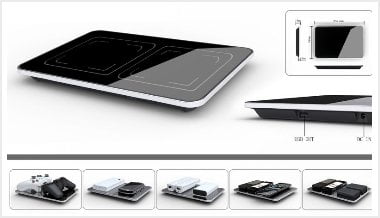
Innex Electrohub Charger


Innex Electrohub charger


There's no reason to carry multiple cords and have to deal with finding extra outlets when you have this clever charging system. The gadgets simply lie on the pad and are charged with induction forces. It's ideal for travel but can also help clean up the counters and tops of dressers on the home front. With the ability to charge up to 6 devices at one time, the system will work with mobile phones,iPods, video game remotes and many more devices.


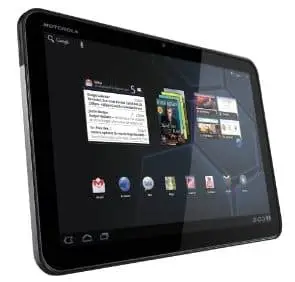
 Motorola Xoom


Motorola XOOM
Available in time for the holiday rush, this tablet is designed to run on the Honeycomb used by Android 3.0’s. The screen is a fully 10.1” featuring 1280×800 pixels. A dual-core processor runs the system while you can choose between a 2-MP and a 5-MP camera for taking pictures. With 32GB of internal storage and SD capabilities, there’s not much you can’t do with this tablet.


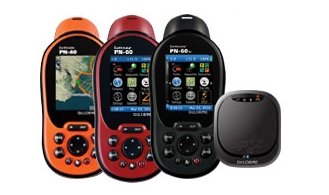
Earthmate GPS


EarthMate GPS


GPS systems for cars are great, except that you can't take them in the woods. Smart phones with map features are also cool, as long as you are in cell phone range. If you are a hiker, hunter or general outdoorsman, then the Earthmate GPS is for you. It works where cell phone won't, is a completely hand-held GPS and you can also use it to send and receive text messages. The buddy system is still important, but with this device you can send a text message for help and provide searchers with an easy way to find you.


Wednesday, November 2, 2011

IT- CoMpUtEr HaRdWaRe...

What is Hardware?

Your PC (Personal Computer) is a system, consisting of many components. Some of those components, like Windows XP, and all your other programs, are software. The stuff you can actually see and touch, and would likely break if you threw it out a fifth-story window, is hardware.

Not everybody has exactly the same hardware. But those of you who have a desktop system, like the example shown in Figure 1, probably have most of the components shown in that same figure. Those of you with notebook computers probably have most of the same components. Only in your case the components are all integrated into a single book-sized portable unit.


Figure 1
The system unit is the actual computer; everything else is called a peripheral device. Your computer's system unit probably has at least one floppy disk drive, and one CD or DVD drive, into which you can insert floppy disks and CDs. There's another disk drive, called the hard disk inside the system unit, as shown in Figure 2. You can't remove that disk, or even see it. But it's there. And everything that's currently "in your computer" is actually stored on that hard disk. (We know this because there is no place else inside the computer where you can store information!).


Figure 2
The floppy drive and CD drive are often referred to as drives with removable media or removable drives for short, because you can remove whatever disk is currently in the drive, and replace it with another. Your computer's hard disk can store as much information as tens of thousands of floppy disks, so don't worry about running out of space on your hard disk any time soon. As a rule, you want to store everything you create or download on your hard disk. Use the floppy disks and CDs to send copies of files through the mail, or to make backup copies of important items.

Random Access Memory (RAM)

There's too much "stuff" on your computer's hard disk to use it all at the same time. During the average session sitting at the computer, you'll probably use only a small amount of all that's available. The stuff you're working with at any given moment is stored in random access memory (often abbreviated RAM, and often called simply "memory"). The advantage using RAM to store whatever you're working on at the moment is that RAM is very fast. Much faster than any disk. For you, "fast" translates to less time waiting and more time being productive.

So if RAM is so fast, why not put everything in it? Why have a hard disk at all? The answer to that lies in the fact that RAM is volatile. As soon as the computer is shut off, whether intentionally or by an accidental power outage, every thing in RAM disappears, just as quickly as a light bulb goes out when the plug is pulled. So you don't want to rely on RAM to hold everything. A disk, on the other hand, holds its information whether the power is on or off.

The Hard Disk

All of the information that's "in your computer", so to speak, is stored on your computer's hard disk. You never see that actual hard disk because it's sealed inside a special housing and needs to stay that way. Unlike RAM, which is volatile, the hard disk can hold information forever -- with or without electricity. Most modern hard disks have tens of billions of bytes of storage space on them. Which, in English, means that you can create, save, and download files for months or years without using up all the storage space it provides.
In the unlikely event that you do manage to fill up your hard disk, Windows will start showing a little message on the screen that reads "You are running low on disk space" well in advance of any problems.  In fact, if that message appears, it won't until you're down to about 800 MB of free space. And 800 MB of empty space is equal to about 600 blank floppy disks. That's still plenty of room!

The Mouse

Obviously you know how to use your mouse, since you must have used it to get here. But let's take a look at the facts and buzzwords anyway. Your mouse probably has at least two buttons on it. The button on the left is called the primary mouse button, the button on the right is called the secondary mouse button or just the right mouse button. I'll just refer to them as the left and right mouse buttons. Many mice have a small wheel between the two mouse buttons, as illustrated in Figure 3.
Figure 3
 
The idea is to rest your hand comfortably on the mouse, with your index finger touching (but not pressing on) the left mouse button. Then, as you move the mouse, the mouse pointer (the little arrow on the screen) moves in the same direction. When moving the mouse, try to keep the buttons aimed toward the monitor -- don't "twist" the mouse as that just makes it all the harder to control the position of the mouse pointer.
If you find yourself reaching too far to get the mouse pointer where you want it to be on the screen, just pick up the mouse, move it to where it's comfortable to hold it, and place it back down on the mousepad or desk. The buzzwords that describe how you use the mouse are as follows:
  • Point: To point to an item means to move the mouse pointer so that it's touching the item.
  • Click: Point to the item, then tap (press and release) the left mouse button.
  • Double-click: Point to the item, and tap the left mouse button twice in rapid succession - click-click as fast as you can.
  • Right-click: Point to the item, then tap the mouse button on the right.
  • Drag: Point to an item, then hold down the left mouse button as you move the mouse. To drop the item, release the left mouse button.
  • Right-drag: Point to an item, then hold down the right mouse button as you move the mouse. To drop the item, release the right mouse button.

The Keyboard

Like the mouse, the keyboard is a means of interacting with your computer. You really only need to use the keyboard when you're typing text. Most of the keys on the keyboard are laid out like the keys on a typewriter. But there are some special keys like Esc (Escape), Ctrl (Control), and Alt (Alternate). There are also some keys across the top of the keyboard labeled F1, F2, F3, and so forth. Those are called the function keys, and the exact role they play depends on which program you happen to be using at the moment.
Most keyboards also have a numeric keypad with the keys laid out like the keys on a typical adding machine. If you're accustomed to using an adding machine, you might want to use the numeric keypad, rather than the numbers across the top of the keyboard, to type numbers. It doesn't really matter which keys you use. The numeric keypad is just there as a convenience to people who are accustomed to adding machines.
Figure 4
Most keyboards also contain a set of navigation keys. You can use the navigation keys to move around around through text on the screen. The navigation keys won't move the mouse pointer. Only the mouse moves the mouse pointer.
On smaller keyboards where space is limited, such as on a notebook computer, the navigation keys and numeric keypad might be one in the same. There will be a Num Lock key on the keypad. When the Num Lock key is "on", the numeric keypad keys type numbers. When the Num Lock key is "off", the navigation keys come into play. The Num Lock key acts as a toggle. Which is to say, when you tap it, it switches to the opposite state. For example, if Num Lock is on, tapping that key turns it off. If Num Lock is off, tapping that key turns Num Lock on.


Monday, October 31, 2011

Information Technology.....IT

What is Information Technology?

Information Technology, or IT, is the study, design, creation, utilization, support, and management of computer-based information systems, especially software applications and computer hardware.
IT is not limited solely to computers though. With technologies quickly developing in the fields of cell phones, PDAs and other handheld devices, the field of IT is quickly moving from compartmentalized computer-focused areas to other forms of mobile technology.


Who works in the field of Information Technology?

In today’s advanced technological environment, the field of IT is very large; those who work in the field are computer hardware and software designers, computer engineers, and specialists who maintain large computer networks and database systems.

IT professionals maintain databases for organizations and make sure that they are up to date and run smoothly. They resolve problems with the computers on their network by installing and maintaining the programs that run on them, monitoring overall system health and resolving problems such as computer viruses so that they do not spread quickly and cause network-wide system crashes.


What is the Future of Information Technology?

The IT field is evolving and developing every day. New technologies in computers and mobile devices are shaping the way the world communicates with one another, gets work done, and spends free time. There is a growing need for individuals with a love of the field, a curiosity for the future, and a desire to be a force in it. Jobs in the field are on the rise, and employers are on the lookout for fresh talent; those who want to play a part in IT’s future have no limits on their potential or on the potential of their specific field.

Nilai sebuah senyuman...Khas utk semua..(^_^)

Dia tidak meminta bayaran,
tapi harganya sungguh tak ternilai.
Dia memperkaya mereka yang menerimanya,
tanpa membuat melarat mereka yang memberinya.
Dia hanya terjadi sekejap,
namun kenangan tentangnya bertahan begitu lama.


Tak seorangpun meskipun begitu kaya mampu bertahan tanpa dia,
Dan tak seorangpun begitu miskin,,
tetapi menjadi kaya kerana manfaatnya.
Dia menciptakan kebahagiaan untuk orang lain.


Dia memberi rasa dalam letih,
sinar terang dalam keputusasaan,
sinar mentari dalam kesedihan dan penangkal bagi kesulitan dalam hidup.
Namun dia tidak bisa dibeli,
dipinjam atau dicuri.
Kerana dia adalah sesuatu yang tidak berguna sebelum diberikan kepada orang lain.

Sunday, October 16, 2011

THE POWER OF DREAM


Setiap manusia di dunia ini mempunyai impian.....Dan termasuk saya..
Namun kita haruslah berani mencapai impian itu, walaupun kita tahu banyak risiko dan halangan yang datang menghalang kita.....
Maka jadilah seorang yang berani dalam melakukan apa-apa sahaja....
Kerana dengan keberanian itulah kita boleh menempuh kejayaan di masa akan datang....

Oleh itu tonton la video ni dan jadilah sebagai inspirasi untuk mencapai kejayaan.

Kata-kata semangat dan perangsang kejayaan

Setiap dari kita di bumi ini memilikinya
Keupayaan untuk memimpin
...dan menjadi contoh kepada yang lain.
Adakalanya apa yang kita lakukan terasa kecil dan tidak bermakna.
Akan tetapi ingat, riak-riak air yang kecil boleh bercamtum....
lalu menjadi ombak besar yang tidak terhalang lagi.

Bermulalah dengan satu langkah kecil.
Jangan biarkan yang lain menghalang anda.
Ikuti jalan diri anda.
Mungkin ada yang akan ketawa.
Biarkan.
Ramai yang akan mengikut nanti.

Jangan sesekali berputus asa.
Kejayaan......
Adalah suatu usaha berterusan setelah mereka yang lain
sudah berhenti dari mengejarnya.
Rasa takut hanya menjadikan manusia itu kerdil.
Berlarilah ke arah rasa takut anda.
Raikannya....
Di seberang, takut terbesar anda ternanti hidup anda yang terhebat.

Bangkitlah dari duduk.
Masuklah ke gelanggang.
Bermainlah dengan kehidupan.
Ambil risiko.
Lompatlah dan jaring penyelamat pun akan muncul.

Sentiasalah berfikiran positif.
Apa yang anda fikirkan, adalah siapa diri anda yang bakal anda jadi.
Impikan.
Besarkan impian itu.
Rasainya.
Percaya padanya.
Capailah ia.
Apa jua yang anda impikan gapailah ia.
Anda bakal menginspirasikan mereka yang lain.

Hulurkan tangan...
Buat mereka yang memerlukan.
kasih mengasihani.
Jadilah insan yang berhati murni.
Apabila seseorang berbuat baik dan melakukan dengan baik, raikan mereka.
Anda akan membuat dua insan rasa gembira.
Jadilah diri tauladan yang positif.
Jadilah perubahan yang anda mahu saksikan di dunia ini.

Lakukan perubahan.
Sekarang....
adalah masa untuk anda
meneraju, memimpin dan mengecapi kejayaan.